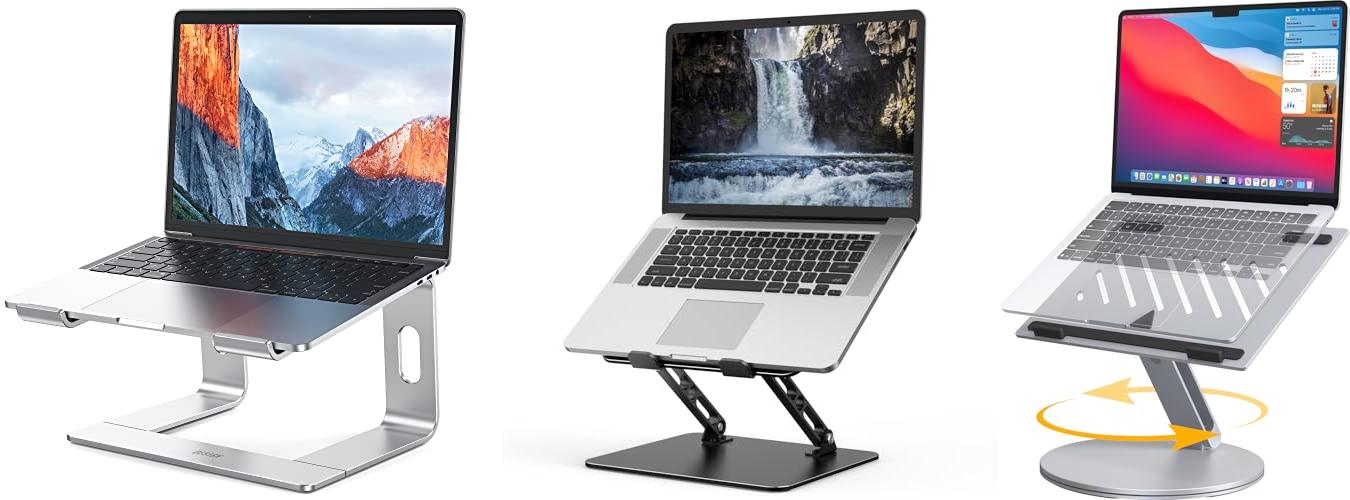
Does your neck hurt after a long day of working on your computer? Do you find yourself hunching over your desk, feeling a little stiff? You’re not alone! Many of us spend hours in front of our screens, and our bodies feel the strain. Choosing a computer stand might seem simple, but with so many different types and features, it can actually be a real head-scratcher. You want to find one that helps you sit up straighter and feel more comfortable, but where do you even start?
Well, get ready to say goodbye to those aches and pains! In this post, we’re going to dive deep into the world of computer stands. We’ll break down what makes a good one and help you figure out exactly what you need. You’ll learn how to pick the perfect stand to make your workspace more comfortable and your work more enjoyable. So, keep reading, and let’s find the computer stand that’s just right for you!
Our Top 5 Computer Stand Recommendations at a Glance
Top 5 Computer Stand Detailed Reviews
1. BESIGN LS03 Aluminum Laptop Stand

Rating: 9.4/10
Tired of hunching over your laptop? The BESIGN LS03 Aluminum Laptop Stand is here to help! This sleek silver stand is designed to make your computer time more comfortable and your workspace tidier. It’s made from strong aluminum and can hold laptops from 10 to 15.6 inches. This means it works with many popular brands like Apple MacBook Air and Pro, Dell, HP, and Lenovo.
What We Like:
- It fits almost any laptop, from small 10-inch models to larger 15.6-inch ones.
- It raises your screen about 6 inches, which is great for your neck and shoulders.
- The stand is super easy to put together and take apart, making it great for moving around.
- It’s built with sturdy aluminum and can hold up to 8.8 pounds, so your laptop stays put.
- Rubber grips keep your laptop from sliding and protect it from scratches.
- The open design lets air flow around your laptop, helping it stay cool.
- It folds flat, saving desk space and keeping things neat.
- Putting it together takes only 3 simple steps.
What Could Be Improved:
- While it’s great for many laptops, some very thick or unusually shaped laptops might not fit perfectly.
- The silver color might show fingerprints easily over time.
This laptop stand is a fantastic tool for anyone who spends a lot of time on their computer. It offers a comfortable way to work and helps keep your desk organized.
2. Gogoonike Adjustable Laptop Stand for Desk

Rating: 8.7/10
Meet the Gogoonike Adjustable Laptop Stand, a metal foldable riser designed for your desk. This portable stand works for laptops from 10 to 15.6 inches and helps keep your computer cool.
What We Like:
- You can adjust the height and angle to find a comfortable position. This helps your posture and reduces neck, back, and eye strain. It’s great for working at home, in the office, or outside.
- The stand is made of strong metal. It can hold up to 17.6 pounds. Rubber mats and silicone pads keep your laptop from slipping or getting scratched. The edges are smooth, so they won’t hurt your hands.
- The top has many holes for air to flow. This helps your laptop stay cool while you use it.
- It folds up easily. You can put it in your backpack. It’s perfect for people who travel a lot for work.
- This stand works with most laptops. This includes brands like MacBook, Dell, HP, and Microsoft Surface.
What Could Be Improved:
- While sturdy, some users might prefer a wider base for extra stability with very large laptops.
- The adjustment mechanism, while functional, could be smoother for quicker changes in height and angle.
This Gogoonike laptop stand is a solid choice for improving your workspace comfort and keeping your device cool. It offers good value for its features and portability.
3. YICOSUN Laptop Stand for Desk

Rating: 9.2/10
The YICOSUN Laptop Stand is a versatile desk accessory designed to boost your comfort and productivity. Its sleek silver finish and aluminum construction make it a stylish addition to any workspace, whether at home or in the office. This stand aims to solve common issues like neck strain and overheating, making your laptop use more enjoyable.
What We Like:
- The 360° rotating base makes sharing your screen with others super easy. You don’t have to move your whole laptop around anymore!
- You can adjust the height and angle without any tools. This helps you find the perfect position to avoid neck and shoulder pain.
- It’s built with strong aluminum alloy, so it feels very stable and won’t wobble. The non-slip pads keep your laptop safe.
- The hollow design with cooling vents helps keep your laptop from getting too hot. This means your laptop can work better for longer.
- It folds up nicely, making it easy to carry around. You can use it anywhere you need it.
- It works with most laptops from 10 to 16 inches, including popular brands like MacBook, Dell, and Lenovo.
What Could Be Improved:
- Remember to take your laptop off the stand before you change its height or angle. This is important to keep your device safe.
This YICOSUN laptop stand offers great flexibility and comfort. It’s a practical upgrade for anyone who spends a lot of time using their laptop.
4. WALI Computer Monitor Stand for Desk

Rating: 9.0/10
Tired of a cluttered desk and uncomfortable neck strain? The WALI Computer Monitor Stand (STT003) offers a simple yet effective solution for any workspace. This sturdy black stand not only elevates your monitor but also helps you organize your supplies, making your work or study area more efficient and comfortable.
What We Like:
- It has a large 14.6 x 9.3-inch metal shelf. This shelf fits most monitors, laptops, and even printers.
- The stand can hold up to 44 lbs (20kg), so it’s strong and reliable.
- Rubber pads on the bottom stop it from sliding and protect your desk.
- You can adjust the height to 3.9, 4.7, or 5.5 inches. This helps you find a comfortable viewing angle.
- Raising your monitor can reduce neck and back pain.
- The platform has holes to let air flow. This keeps your devices from getting too hot.
- Its sleek, modern design looks good on any desk.
- There’s extra space underneath for storing keyboards, notebooks, or other office supplies.
- It comes with helpful customer support from the US.
What Could Be Improved:
- The height adjustment options are fixed; you can’t fine-tune the height between the given settings.
- While it holds a good amount of weight, very large or heavy equipment might not be suitable.
This WALI monitor stand makes your desk tidier and your work more comfortable. It’s a practical upgrade for any home or office.
5. GleYo Laptop Stand for Desk Detachable Aluminum Computer Riser Portable Metal Notebook Printer Stand Holder Compatible with MacBook Air

Rating: 9.3/10
Tired of hunching over your laptop? The GleYo Laptop Stand for Desk is a game-changer for your workspace. This sleek, silver aluminum stand is designed to make using your laptop more comfortable and efficient, whether you’re at home, in the office, or on the go.
What We Like:
- It works with almost any laptop from 10 to 16 inches, including MacBooks, Dell, HP, and Lenovo.
- It lifts your screen up 6 inches, which is great for your neck and back. You’ll feel less strain on your body.
- The stand has a special hollow design that helps your laptop stay cool. This keeps your computer running smoothly.
- Made from strong aluminum, it’s lightweight but can hold up to 5 kg. It’s built to last.
- It comes apart easily into three main pieces and two connectors, so you can take it anywhere.
What Could Be Improved:
- While it’s designed for portability, some users might find the 6-inch height a bit too low for their preference.
- The snap-together assembly is easy, but ensuring it’s perfectly secured every time might require a quick check.
This GleYo laptop stand offers a fantastic way to improve your comfort and protect your laptop. It’s a smart investment for anyone who spends a lot of time at their computer.
Finding the Perfect Computer Stand: A Smart Choice for Your Workspace
Is your desk a little crowded? Do you find yourself craning your neck to see your screen? A computer stand can be a game-changer for your comfort and organization. This guide will help you pick the best one for your needs.
Why You Need a Computer Stand
A computer stand lifts your monitor or laptop to a better viewing height. This helps your posture. It also frees up space on your desk. You can store your keyboard or other items underneath. It makes your workspace tidier.
Key Features to Look For
When you shop for a computer stand, keep these features in mind:
- Adjustability: Can you change the height and angle? This is important for finding the perfect position. Some stands let you tilt your screen. Others let you raise or lower it.
- Weight Capacity: Make sure the stand can hold your monitor or laptop. Check the product details. Don’t overload it.
- Size and Space: Measure your desk. Make sure the stand fits. Think about how much space you need underneath for storage.
- Stability: A wobbly stand is no good. Look for stands with a sturdy base. Rubber feet help keep it from sliding.
- Cable Management: Some stands have special slots or clips. These keep your cords neat and out of the way. This makes your desk look much cleaner.
Important Materials
The material of a computer stand affects its look and durability.
- Wood: Wooden stands look nice. They are strong. They can be made from bamboo or solid wood. Bamboo is a good choice because it’s a renewable resource.
- Metal: Metal stands are very strong. They often have a sleek, modern look. Aluminum and steel are common. They can hold heavier monitors.
- Plastic: Plastic stands are usually the most affordable. They are lightweight. Some high-quality plastics can be very durable. Look for thicker, sturdy plastic.
Factors That Improve or Reduce Quality
Good quality stands have certain traits. Poor quality ones might have problems.
What Makes a Stand Great:
- Solid Construction: The stand feels sturdy. It doesn’t bend or creak.
- Smooth Adjustments: If it’s adjustable, the parts move easily. They lock in place securely.
- Non-Slip Surfaces: The top of the stand has a grippy surface. Your monitor or laptop won’t slide off.
- Well-Finished Edges: There are no sharp edges. It feels smooth to the touch.
What to Watch Out For:
- Flimsy Materials: The stand feels cheap. It bends easily.
- Difficult Adjustments: It’s hard to change the height or angle. The parts stick.
- Slippery Surfaces: Your devices might slide around.
- Rough Edges: This can be uncomfortable. It might even scratch your devices.
User Experience and Use Cases
A computer stand improves your daily computer use.
- Ergonomics: Standing the monitor at eye level reduces neck and eye strain. This is great for long work or study sessions.
- Desk Organization: The space under the stand is perfect for your keyboard, mouse, or notebooks. It makes your desk look clean and organized.
- Gaming Setups: Gamers can use stands to position their monitors for the best view.
- Creative Workspaces: Artists and designers can use stands to angle their tablets or monitors. This can help with drawing or editing.
- Home Offices: A computer stand makes a home office more comfortable and productive.
Frequently Asked Questions About Computer Stands
Q: What are the main benefits of using a computer stand?
A: Computer stands help improve your posture by raising your screen. They also create extra storage space on your desk.
Q: How do I know if a stand can hold my monitor?
A: Check the stand’s weight capacity. Compare it to the weight of your monitor. Always choose a stand that can hold more than your monitor weighs.
Q: What’s the best material for a computer stand?
A: Wood and metal stands are usually very durable. Bamboo is a strong and eco-friendly wood option. Metal stands are often the strongest.
Q: Is an adjustable stand worth the extra cost?
A: Yes, adjustable stands offer more flexibility. You can fine-tune the screen height and angle for maximum comfort.
Q: Can a computer stand help with neck pain?
A: Yes. By raising your monitor to eye level, a stand helps you avoid hunching. This reduces strain on your neck and shoulders.
Q: How much space should I leave under the stand?
A: Think about what you want to store. A keyboard, mouse, or notebooks? Measure these items and make sure they fit comfortably underneath.
Q: Are plastic computer stands good quality?
A: Some plastic stands are good quality. Look for thicker, sturdy plastic. They are usually lighter and more affordable than wood or metal.
Q: What is cable management on a stand?
A: Cable management features help you organize your wires. They keep cords from getting tangled and make your desk look neater.
Q: Can I use a computer stand for a laptop?
A: Absolutely! Many stands are designed for laptops. They often have extra features like ventilation to keep your laptop cool.
Q: How do I clean my computer stand?
A: For wood, use a damp cloth and mild soap. For metal, a dry or slightly damp cloth usually works. Always check the manufacturer’s instructions.
In conclusion, every product has unique features and benefits. We hope this review helps you decide if it meets your needs. An informed choice ensures the best experience.
If you have any questions or feedback, please share them in the comments. Your input helps everyone. Thank you for reading.

Hello, I’m Muzammil Siddiqui, the mind behind ChairsFly.com.. With a deep passion for chairs and a wealth of expertise, I created this platform to share my insights, experiences, and knowledge about everything chair-related. From ergonomic solutions to stylish designs, my goal is to guide you in finding the perfect seat for your needs. Let’s embark on this journey of comfort and elegance together!